Managing the Collaborator
I built a production app in two weeks using Claude Code. Not a toy. Not a demo. A real viable thing that people could actually use in their own organizations today. That being said this article is not a focus on the application itself. It’s about what it’s like to build something real with Claude Code — and how much of the work turned out to be managing the collaborator rather than writing code myself.

Groundwork is a requirements intelligence tool. You throw meeting notes at it — or voice transcripts, or those 40-page BRDs that nobody reads — and it pulls out structured requirements. Actors, processes, data entities, business rules, Given/When/Then scenarios, data flows, the works. The stuff a BA spends half a day on after every workshop. Groundwork does it quickly but moves it from disjointed data in to an actionable workspace that teams can continue their work.
This experiment to near production ready app took two weeks in the evenings and weekends from March 8 to March 22. The day-by-day build log has the full timeline of all 413 commits, 18 pull requests, 24 database migrations.
The Extraction Engine
The core problem sounds simple: unstructured text in, structured requirements out. For those unfamiliar:
- Unstructured text commonly means everything from someone’s chicken-scratch meeting notes to a voice transcript riddled with “um” and “so basically” to a formal BRD with nested tables.
- Structured requirements means a real data model — actors with types, processes with ordered steps, data entities with typed attributes, flows between systems, and questions a developer, stakeholder or business analyst would actually need answered.
To address this challenge the extraction pipeline ended up as a two-pass architecture:
- Pass 1 pulls out the nouns — who’s involved and what data structures exist.
- Pass 2 takes those nouns as context and extracts the verbs — what happens, in what order, and where things are vague.
The split exists for a practical reason: when Pass 2 encounters “Manager approves the request,” it needs to already know that “Manager” is a human actor and “Request” is a data entity. Without that context, it guesses. Badly.
One of the better ideas that came out of the collaboration was using Claude’s tool_use instead of a raw JSON. When prompting a model with phrases like “return a JSON object with these fields,” the output is unpredictable. Sometimes you get clean JSON, JSON wrapped in markdown code fences or a friendly preamble followed by JSON.
tool_use sidesteps all of that — you define a schema, force the model to call it, and you always get conforming output. Here’s the foundation tool schema:
const FOUNDATION_TOOL = {
  name: "submit_foundation",
  description: "Submit the extracted foundation model — actors, data entities, and business rules",
  input_schema: {
    type: "object" as const,
    required: ["actors", "dataEntities", "businessRules"],
    properties: {
      actors: {
        type: "array",
        items: {
          type: "object",
          required: ["name", "role", "description", "actorType", "roleCategory"],
          properties: {
            name: { type: "string" },
            role: { type: "string" },
            description: { type: "string" },
            actorType: { type: "string", enum: ["human", "system", "external"] },
            roleCategory: { type: "string", enum: ["project", "operational"] },
          },
        },
      },
      dataEntities: {
        type: "array",
        items: {
          type: "object",
          required: ["name", "description", "attributes"],
          properties: {
            name: { type: "string" },
            description: { type: "string" },
            attributes: { type: "array", items: { type: "string" } },
            attributeTypes: { type: "object", additionalProperties: { type: "string" } },
          },
        },
      },
      businessRules: { type: "array", items: { type: "string" } },
    },
  },
} as const;
You pair that with tool_choice: { type: "tool", name: "submit_foundation" } and the model has no choice but to fill in the schema. No JSON parsing surprises.
The system prompt behind Pass 1 has to handle every format under the sun. Here’s the section on actor classification, which has a interesting anecdote when working with a partner like Claude Code:
ACTORS — every confirmed person, role, department, external party, or system interacting
with the solution.
  CRITICAL: Only include actors whose existence or involvement is established in the input.
  Do NOT add actors that are described as undecided, TBD, or under discussion.
  Set "actorType" to:
    "human"    — a person or role (e.g. Manager, Analyst, Admin User, Approver)
    "system"   — an internal application, platform, database, or service (e.g. SAP, CRM)
    "external" — an outside party or third-party system (e.g. Customer, Vendor)
  Set "roleCategory" to:
    "project"     — a project participant who helps with discovery/requirements/building
    "operational" — a durable operational role that will own processes after the project ends
The “CRITICAL” line about TBD actors wasn’t there originally. Early extractions would hit a sentence like “who will review is not decided — could be PCAs, managers, or PMO” and cheerfully add all three as confirmed actors. The model saw names, so it extracted names. Didn’t matter that the sentence literally said “not decided.” This meant having to clearly spell out the rules: if the source says it’s TBD, don’t make it up.
The pipeline also scales its token budgets based on input length and injects prior session data as context so it doesn’t re-extract things that already exist — but those are implementation details better saved for a dedicated post.
There’s something delightful having Claude Code write the prompts that instruct its own Claude API. Claude Code would draft a system prompt, we could test it against real meeting notes and if it hallucinated something then Claude Code would fix the prompt. This helped make sure the instructions were in a clean structure it understood and helped reduce my interpretation of a valid rule.
There’s a lot more to the extraction pipeline than I can cover here — the two-pass strategy, token budget tuning, prompt iteration patterns. I’m planning a dedicated post on building structured extraction with Claude’s tool_use.
Designing in the Browser
When working with various mockups I found that some times describing the “feel” or (for the cool kids) “vibe” helped Claude Code connect the dots effectively. For instance when working on the team tab I used — “the team tab should feel like a theater playbill, not a data table” — and Claude Code would spit out a full HTML mockup with inline CSS so that I could review in the browser and call out specifics to make sure we were interpreting the same thing before actual development started.
This approach naturally meant we iterated a lot:
- Team tab: 6 versions. Started as a two-column card layout split by project vs. operational roles, ended as a flat grouped list with involvement context and gap indicators for unfilled roles.
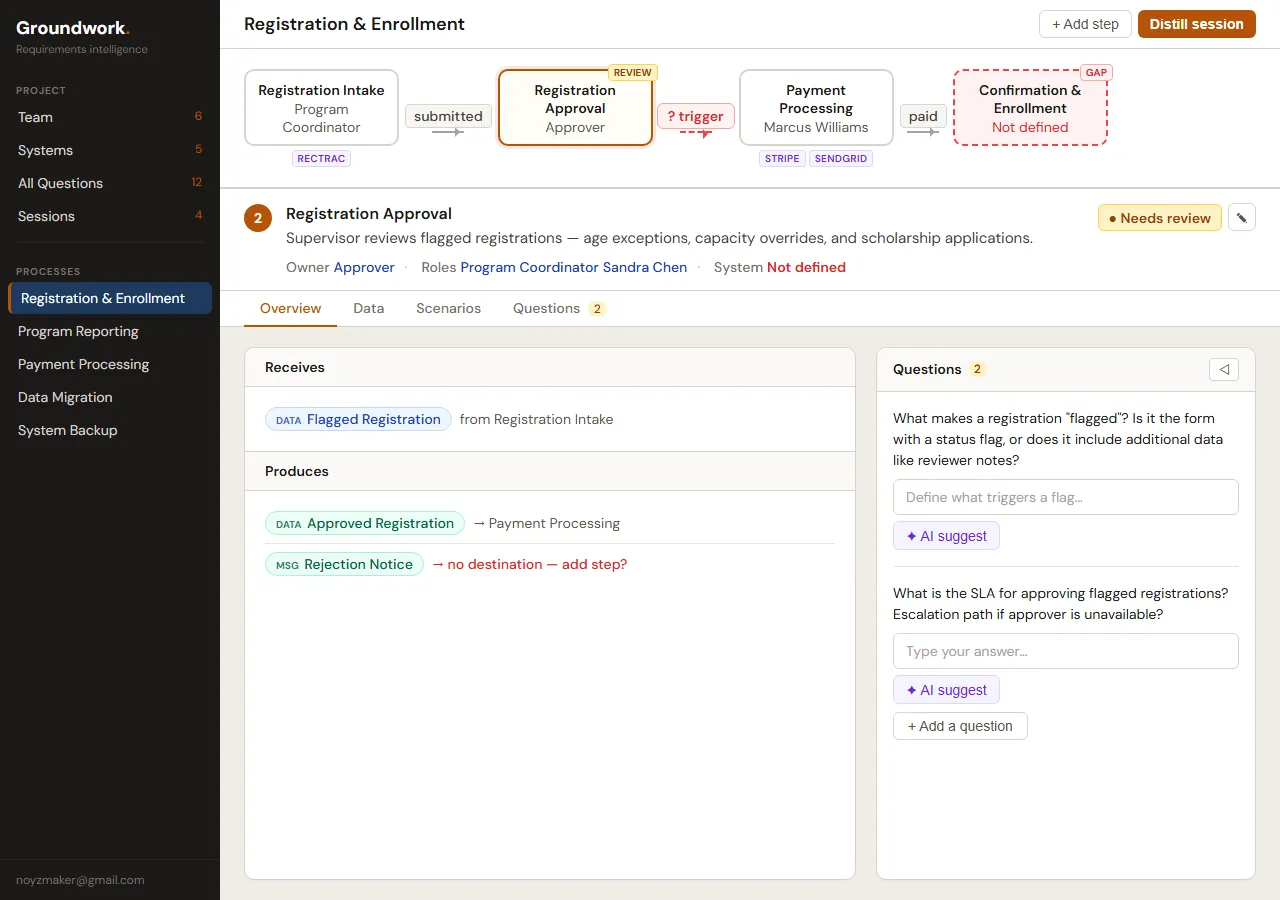
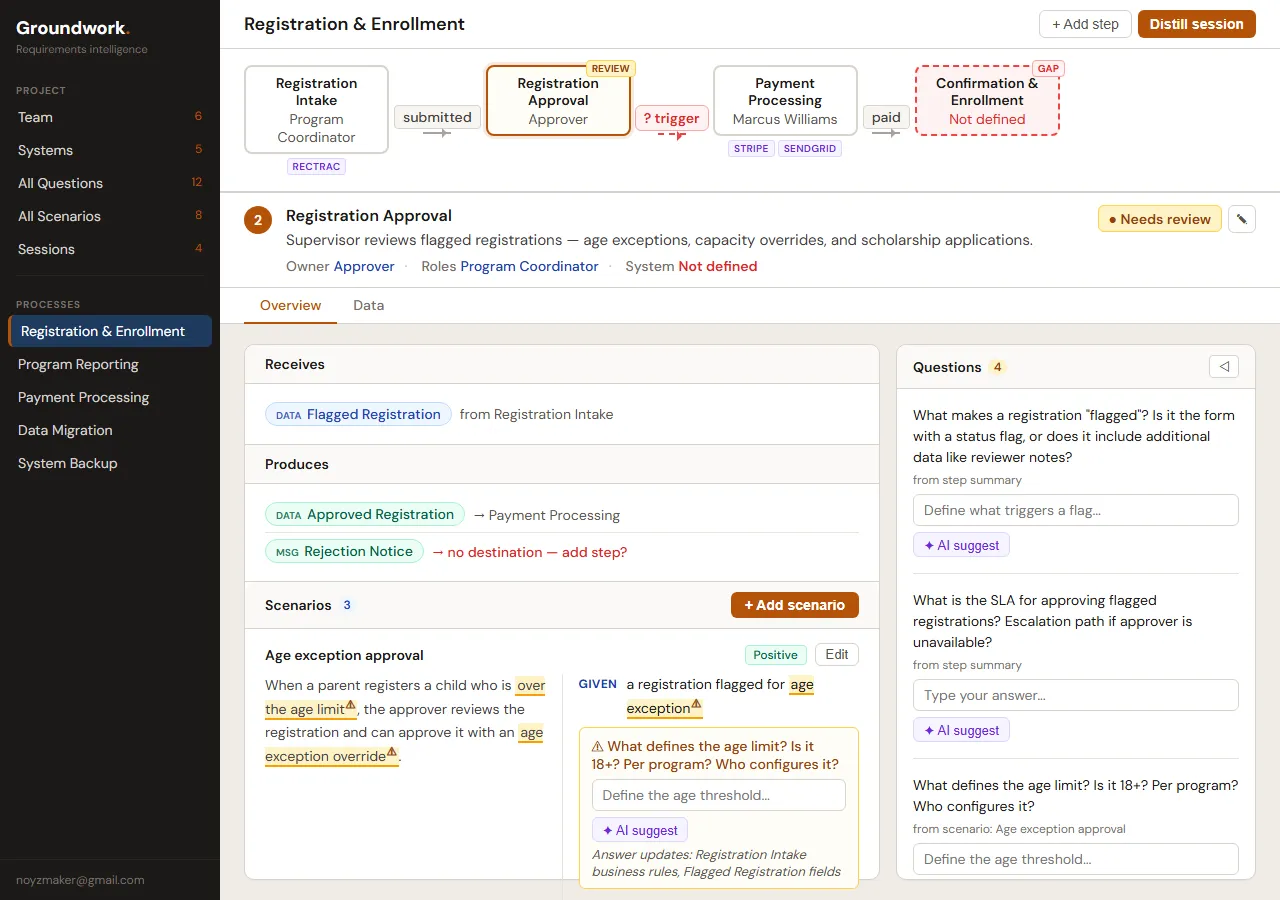
- Process workspace: 6 versions. Getting a flow diagram and a step detail panel to share a screen without fighting each other is harder than it sounds.
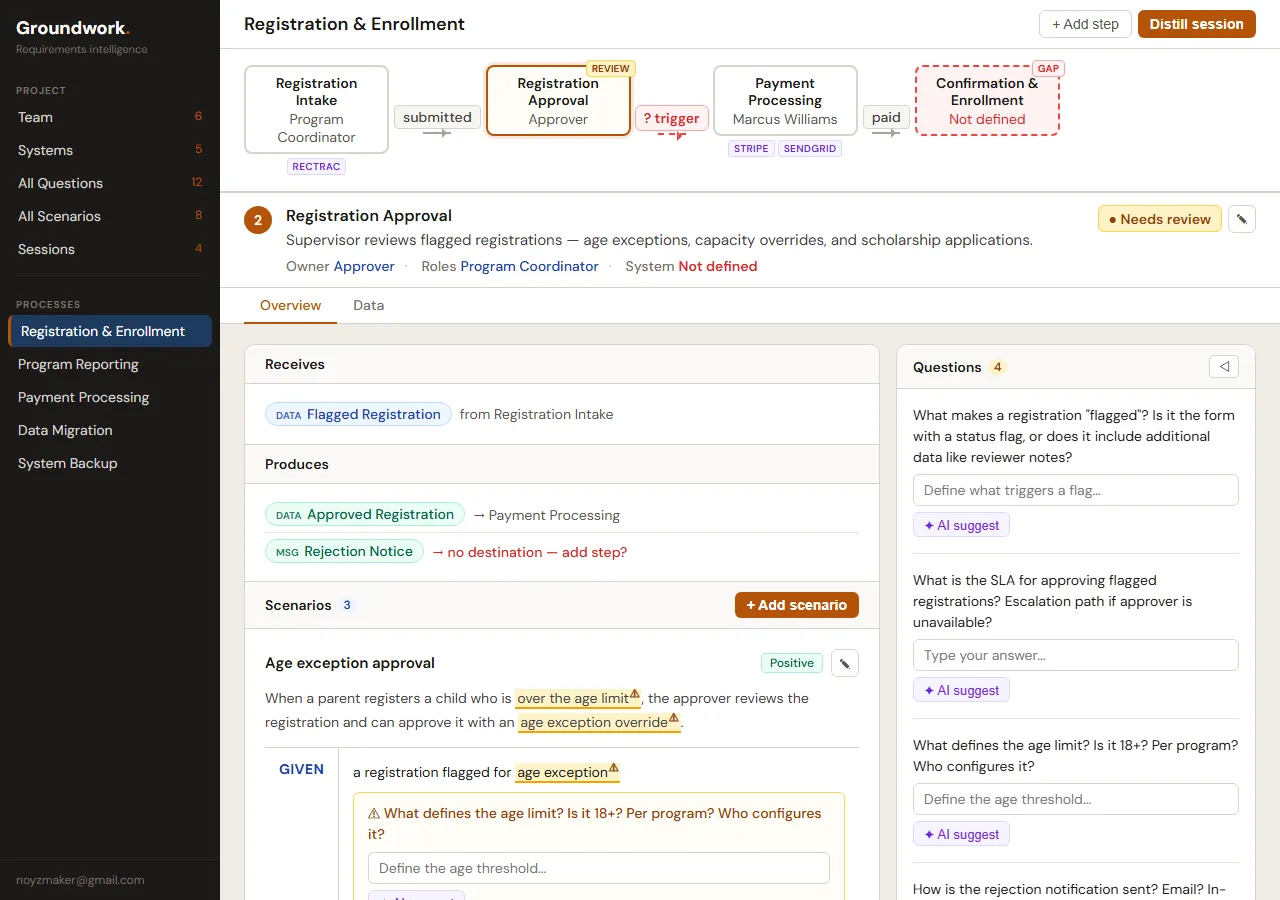
- Scenario display: 8 versions. This one nearly killed me. How do you show Given/When/Then scenarios inline without the whole page turning into a test plan?
- Systems/Integrations: 6 versions.
- Data tab: 4 versions.
- Processes tab: 6 versions.
- Diff/merge review: 2 versions.
That’s 40-something HTML mockups and rendered pages I could look at and immediately feel whether the layout worked or what needed to be adjusted.
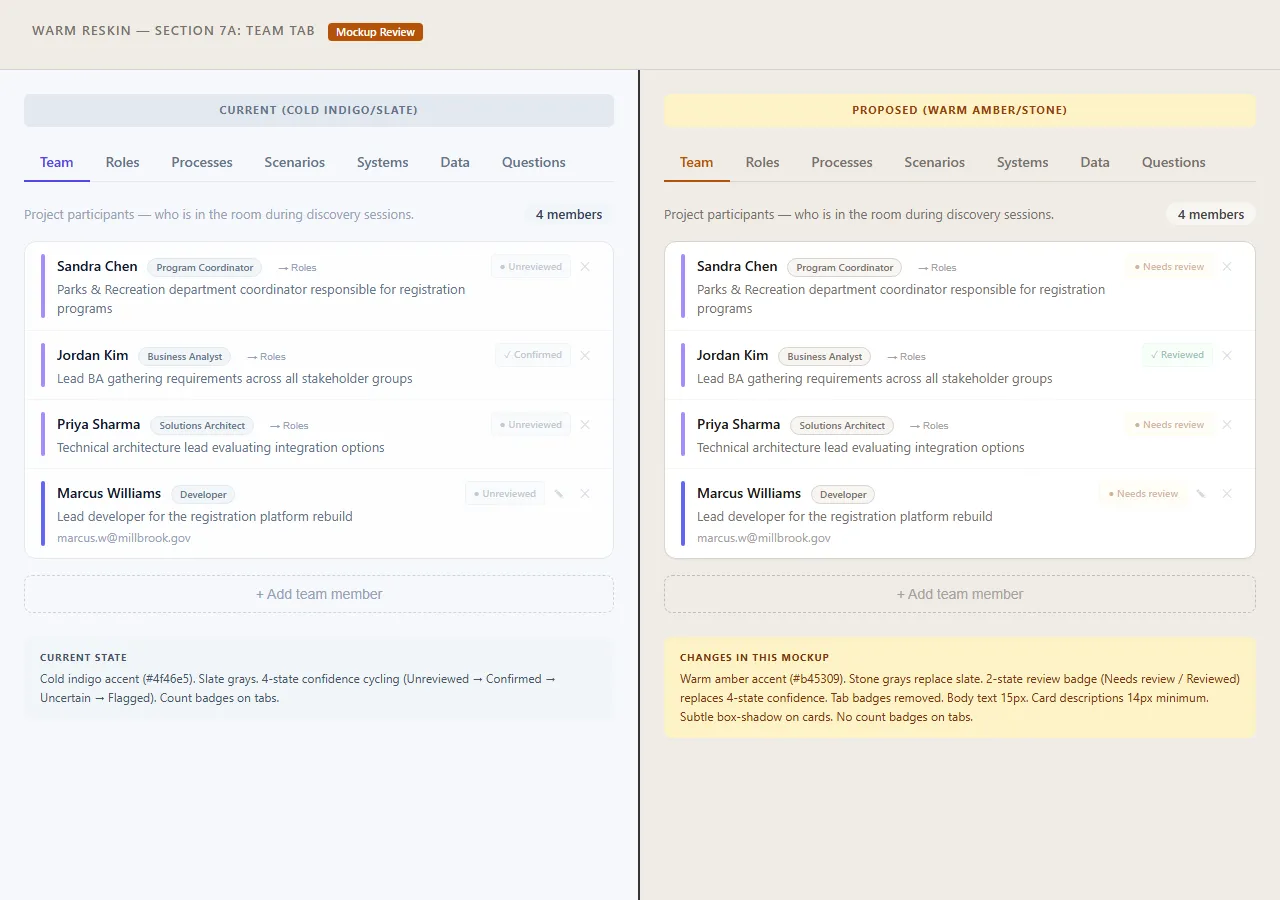 V1 of the team tab. Two-column layout, cards with role badges. Functional, but flat.
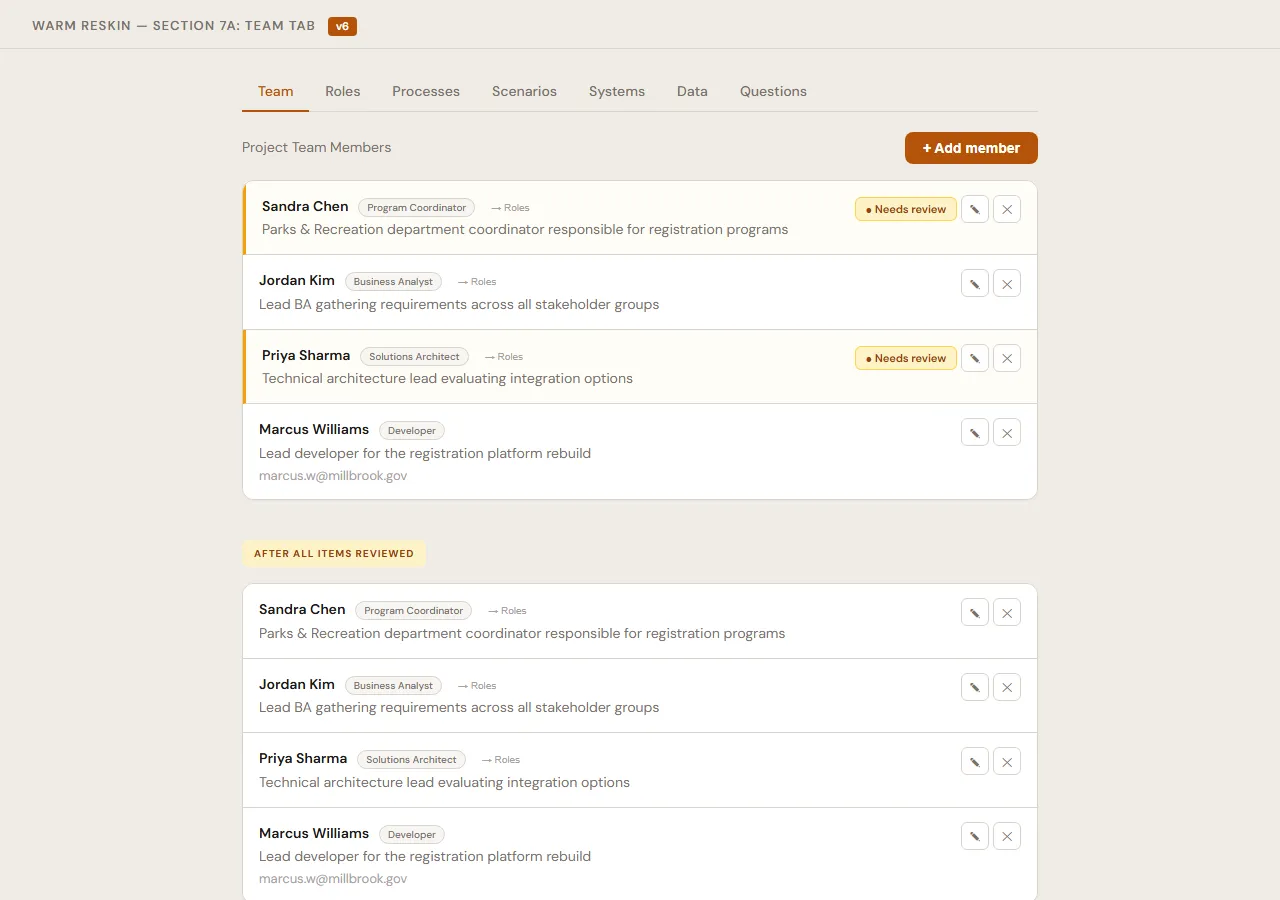 V6. Same data, completely different feel. Grouped by role type, involvement tables, unfilled role gaps called out explicitly.
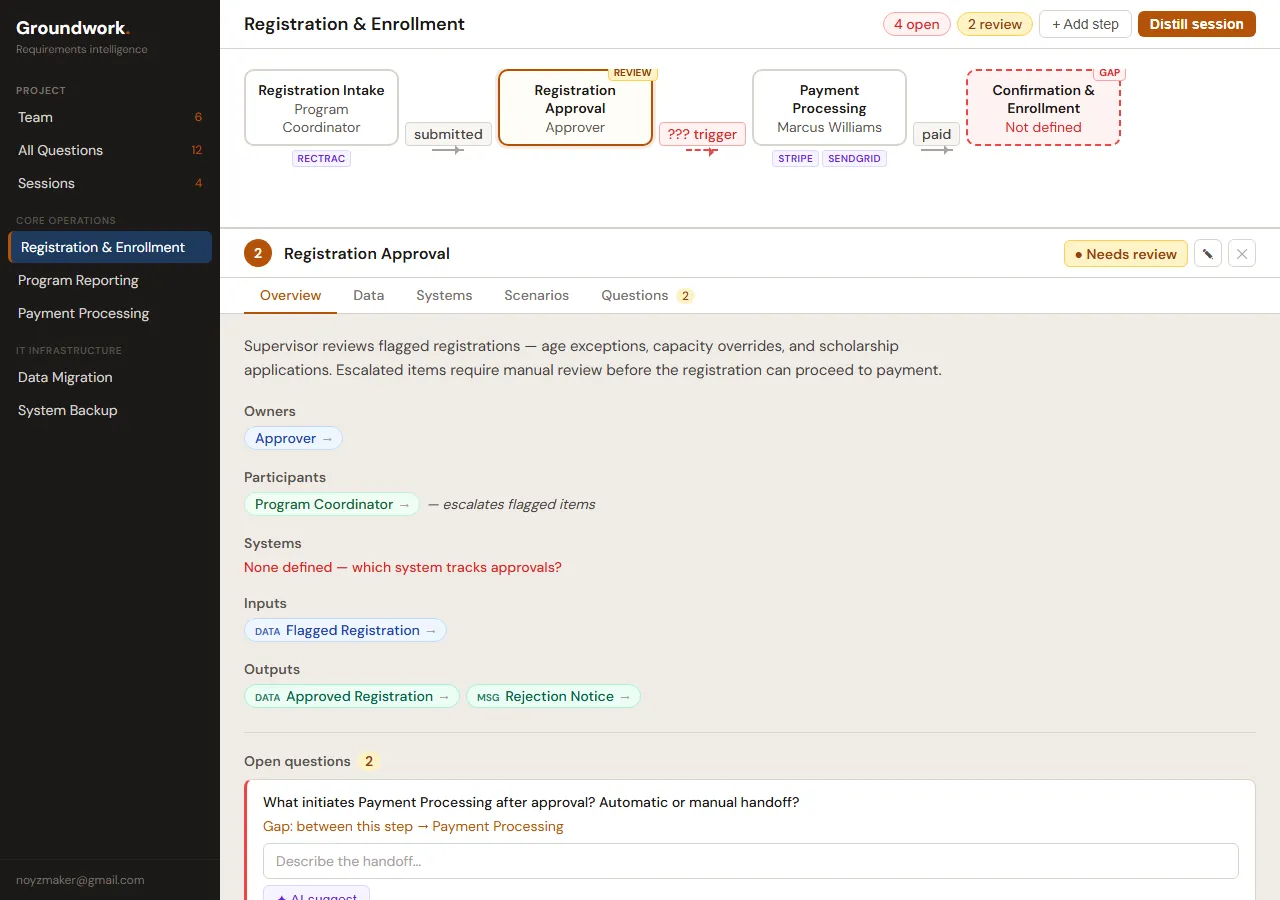 First crack at the split workspace. Flow diagram on top, step detail below. They’re fighting for attention.
 V6. The flow diagram became an orientation map, the step detail became the actual work surface. Receives/Produces/Questions laid out so you can scan without scrolling.
 V1 of the scenario display. Scenarios inline with the step detail. It works, but it’s getting crowded.
 Eight iterations later. Scenarios tuck into collapsible cards. The page doesn’t feel like a test plan anymore.
The feedback was conversational in a way I genuinely didn’t expect. I’d say “the systems tab feels like a settings page, not a workspace” and it wouldn’t just tweak a color — it’d rethink the whole layout. Move from a flat list to tabbed panels with expandable connection cards. Next version: “the field mapping table is too dense, feels like a spreadsheet.” Another pass. “Closer, but the health dots are too subtle.” And on it goes.
What made it work: Claude Code could hold the full design context within a session. It understood the aesthetic — warm, document-native, editorial. When I said “this feels too cold,” it knew I meant too much white space or too-sharp borders, not that I wanted gradients.
Between sessions, though? Design decisions evaporated.
It couldn’t remember that we’d settled on a specific button treatment three sessions ago. So we started writing spec documents using the superpowers skill for every design session and clearly capturing every decision. This started to make the spec the living reference document and the mockup HTML became the authoritative source of truth. If the mockup showed a 10px uppercase micro label, that’s what the implementation should produce. Not “small label” as reinterpreted by a fresh context window.
This process of brainstorm in HTML with the visual companion, review in browser, spec the decisions, and implement from spec — was the single best shift we made in how development works. This is now my standard for all my future projects.
I want to write more about this workflow — the mechanics of designing with AI through HTML mockups. It’s genuinely different from any design process I’ve used before, and 40+ iterations is a story worth telling properly.
Teaching It to Not Be Stupid
About a week in, I had a realization: the most impactful work happening wasn’t application code. It was CLAUDE.md — the file Claude Code reads at the start of every session. Claude Code wrote these rules itself, but only after I ran into a problem and told it to make sure it never happened again. Every rule in that file exists because something went wrong or I became annoyed or many design sessions (and tokens) were wasted and lost.
Here is a subset of five key example rules from the CLAUDE.md file I use:
“Do exactly what was asked — no substitutions.” I asked for a React Flow mockup. Claude Code decided React Flow was too difficult and would cut corners to build a raw SVG instead. The SVG looked fine in a vacuum but proved absolutely nothing about how the real app would render. I lost an entire session to a prototype that was worthless for its intended purpose.
“Check ALL items, not a sample.” I asked it to audit all fifteen processes in a test project. It checked three, found them consistent, and reported “all processes follow the pattern.” Obviously the three it picked were perfect and it missed numerous edge cases that would have been identified in checking everything as requested.
“When told to plan, ONLY plan.” I’d ask it to think something through before writing code. What I’d get back was a plan and immediately starting to build on that plan without any review or approvals. If the plan had a flaw the code was already written around that flaw. Now instead of adjusting a plan, the whole session goes to unwinding code that shouldn’t have been written in the first place.
“Never declare victory without honest visual validation.” This one stung. Claude Code finished a flow diagram and said “looks good.” I opened the browser. Labels overlapping nodes, connectors going to the wrong places and the layout completely broken.
“Mockups use the real rendering stack.” If I ask for a UI mockup, use the actual technology. A React Flow mockup that’s secretly SVG proves nothing about how React Flow will render it.
In addition to these behavioral rules it was imperative we also set up automated guardrails. Hooks are extremely powerful and add the needed “mechanical check” for Claude to be kept in line.
This a sample of my settings.json that fire on every file edit:
{
  "hooks": {
    "PostToolUse": [
      {
        "matcher": "Edit|Write",
        "hooks": [
          {
            "type": "command",
            "command": "JQ=$(...); \"$JQ\" -r '.tool_input.file_path // .tool_response.filePath // empty' | { read -r f; if [ -n \"$f\" ] && echo \"$f\" | grep -qE '\\.(ts|tsx|js|jsx|mjs)$'; then npx eslint --fix \"$f\" 2>/dev/null; fi; exit 0; }"
          }
        ]
      }
    ],
    "PreToolUse": [
      {
        "matcher": "Edit|Write",
        "hooks": [
          {
            "type": "command",
            "command": "JQ=$(...); \"$JQ\" -r '.tool_input.file_path // empty' | { read -r f; if [ -n \"$f\" ] && echo \"$f\" | grep -qE '[.]env'; then echo '{\"decision\":\"block\",\"reason\":\"Do not edit .env files - secrets are in GCP Secret Manager\"}'; fi; }"
          }
        ]
      }
    ]
  }
}
The post-edit hook auto-runs ESLint with --fix on every TypeScript file. Formatting stays consistent without me thinking about it. The pre-edit hook blocks any attempt to touch .env files — secrets live in GCP Secret Manager and an AI has no business editing them locally.
The hook system deserves its own writeup — there’s more to setting up Claude Code for a real project than dropping in a CLAUDE.md file.
Then there’s the validation script. Eighteen rules that run before every commit:
- R1: No importing removed UI components (Button, Card, Input, NavBar from old layer)
- R2: No leftover sidebar color tokens in Tailwind config
- R3: Never read
actor.actorTypedirectly — use the canonicalinferActorType()helper - R4: No “only” suffix on coverage labels
- R5: Every project page must use the
section-pageclass - R6:
inferActorTypemust be imported fromlib/constants, nowhere else - R7: No
as anyor@ts-ignoreescape hatches - R8: Git branch must be
dev,main, orwt/*— nothing else - R9:
lib/constants.tsmust export bothinferActorTypeandinferProcessType - R10: TypeScript must compile cleanly — no type errors
- R11: CSP
unsafe-evalrestricted to development only - R12: No hardcoded
text-[10px]— use thetext-2xsdesign token - R13: CLAUDE.md must be updated alongside route or schema changes
- R14:
docs/todo.mdmust not be modified (managed separately) - R15:
FieldMappingTablemust not receive anentitiesprop - R16: Detect unapplied database migrations
- R17: Full test suite must pass
- R18: No direct commits to
dev— must use a worktree
Every one of them exists because something actually went wrong. Here’s R18, the one that enforces the worktree workflow:
// ─── Rule 18: No direct dev commits — use a worktree ───────────────────────
try {
  let branch18 = execSync("git rev-parse --abbrev-ref HEAD",
    { cwd: ROOT, encoding: "utf-8" }).trim();
  if (branch18 === "HEAD" && process.env.GITHUB_HEAD_REF) {
    branch18 = process.env.GITHUB_HEAD_REF;
  }
  const isCI = !!(process.env.CI || process.env.GITHUB_ACTIONS);
  if (isWorktreeRequired(branch18, isCI)) {
    fail("R18:WorktreeRequired", ROOT, 0,
      `On branch "dev" — sessions must work in a worktree.\n` +
      `    Run: node scripts/worktree.mjs create <topic>`
    );
  }
} catch {
  // git unavailable — skip
}
This exists because Claude Code kept committing directly to dev, skipping the pull request workflow entirely. Those commits dodged code review and occasionally introduced regressions. So now the validation script physically blocks it. If you’re on dev and not running in the automated build pipeline, the commit fails. Go make a worktree.
I’ll do a deep dive on the validation script separately — eighteen rules is too many stories for one post, and the pattern of encoding architectural decisions as automated checks is worth exploring on its own.
The CLAUDE.md file even has a rule about maintaining itself: update it in the same commit as any route change, schema change, or architectural decision. Because Claude Code reads this file at the start of every session. If it’s stale, every session starts with wrong context. Rule 13 in the validation script catches when routes or migrations have been touched more recently than CLAUDE.md and raises a warning.
Without rules, every session was a coin flip — maybe it follows the patterns, maybe it invents new ones. With rules the sessions were predictable, especially since Claude Code doesn’t remember anything between sessions. These rules, hooks and the validation script are the closest thing it has to knowing how the project works.
The Diff/Merge Problem
The hardest technical challenge in Groundwork wasn’t extraction. It was what happens after.
A project has five sessions of meeting notes fed through the pipeline over a couple weeks. Session 3 mentions the same “Project Manager” as Session 1, but describes them differently. Session 4 references a “Proj. Manager” — obviously the same person, different abbreviation. Session 5 introduces a new process that touches actors from every previous session.
If you overwrite on each extraction, you nuke user edits. If you only append, you get duplicates everywhere. Neither option is acceptable.
We ended up with a diff/merge pipeline. Every extracted item gets categorized: new, updated, conflict, or duplicate. The user reviews everything before it touches the canonical data and most importantly no silent overwrites.
The engine behind it is fuzzy name matching:
/** Simple similarity score (0-1) between two strings using common words */
function similarity(a: string, b: string): number {
  const wordsA = new Set(norm(a).split(" "));
  const wordsB = new Set(norm(b).split(" "));
  if (wordsA.size === 0 || wordsB.size === 0) return 0;
  let common = 0;
  for (const w of wordsA) {
    if (wordsB.has(w)) common++;
  }
  return (2 * common) / (wordsA.size + wordsB.size);
}

/** Find the best match from a list of names, returns [index, score] */
function findBestMatch(target: string, candidates: string[]): [number, number] {
  let bestIdx = -1;
  let bestScore = 0;
  for (let i = 0; i < candidates.length; i++) {
    if (norm(candidates[i]) === norm(target)) return [i, 1.0];
    const score = similarity(target, candidates[i]);
    if (score > bestScore) {
      bestScore = score;
      bestIdx = i;
    }
  }
  return [bestIdx, bestScore];
}
Dice coefficient over word sets. Nothing fancy, but it works for requirements names. “Project Manager” vs “Proj. Manager” — they share “Manager,” score 0.67, above the 0.6 duplicate threshold. Flagged for review. “Registration Intake Form” vs “Intake Form” — two shared words out of three.
Score of 1.0 after normalization? Same entity, compare fields for updates. Above 0.6? Potential duplicate, human reviews it. Below 0.6? Genuinely new.
For exact matches, the algorithm diffs individual fields. Changed summary? That’s an update. Session 3 says “done in SAP” but Session 5 says “done in Salesforce”? That’s a conflict — here are your options, pick one.
Sound complex? It is. I don’t understand it but it makes sense to Claude and ends up being the most effective solution for the problem.
Now the user walks through all of this on a review page before anything gets merged. New sessions land in review_state: "pending" and stay there until you’ve accepted, rejected, or resolved everything.
 A session extraction showing what came out — actors, processes, entities, questions — with gap detection and expandable review cards.
And the whole thing is non-destructive. User corrections live in *_overrides JSONB columns. The original extraction is never touched. Overrides get applied at render time: overrides[key] ?? extractedValue. Re-run extraction on new input and your edits survive. I’m pretty proud of this one, honestly.
The diff/merge pipeline — the fuzzy matching, the threshold tuning, the non-destructive override pattern — is probably the most interesting technical problem in the whole project. Future post.
Keeping Parallel Sessions from Colliding
This problem came up once I started running multiple Claude Code sessions at the same time. Inevitably they would start stepping on each other.
Git worktrees solved this. They let you have multiple working directories from the same repo, each on a different branch. I wrapped it in a script:
function cmdCreate(topic) {
  cmdPrune(); // Auto-cleanup merged worktrees

  if (!topic) {
    console.error("Usage: node scripts/worktree.mjs create <topic>");
    process.exit(1);
  }

  const branch = `wt/${topic}`;
  const wtPath = join(WORKTREE_DIR, topic);

  // Fetch latest dev
  console.log("Fetching latest origin/dev...");
  run("git fetch origin dev");

  // Create branch + worktree
  console.log(`Creating worktree: ${branch} → ${wtPath}`);
  run(`git worktree add -b "${branch}" "${wtPath}" origin/dev`);

  // Symlink .env.local
  const envSrc = join(ROOT, ".env.local");
  const envDst = join(wtPath, ".env.local");
  if (existsSync(envSrc)) {
    try {
      symlinkSync(envSrc, envDst, "file");
      console.log("Symlinked .env.local");
    } catch {
      copyFileSync(envSrc, envDst);
      console.log("Copied .env.local (symlink failed)");
    }
  }

  // Install dependencies
  console.log("Running npm install --prefer-offline...");
  execSync("npm install --prefer-offline", { cwd: wtPath, stdio: "inherit" });

  console.log(`\nWorktree ready at: ${wtPath}`);
  console.log(`Branch: ${branch}`);
}
node scripts/worktree.mjs create fix-sidebar-crash — branches from latest dev, symlinks .env.local, installs deps. Done. finish pushes and opens a PR. Merged worktrees auto-prune on the next create.
Without this, parallel Claude Code sessions would walk over each other. One session’s half-done refactor breaks another session’s feature work. Code was being committed in an incomplete manner or part way through another session fix. Worktrees give each session its own sandbox and it was eventually non-negotiable once I started running more than one session at a time.
The worktree workflow — the pruning logic, the symlink fallbacks, the PR automation — could be its own post. If you’re running parallel AI sessions without something like this, you’re going to have a bad time.
What I Actually Think
After two weeks, here’s where we landed.
What worked: The design loop was the star. Brainstorm in HTML, look at it in a browser, iterate, write a spec, and implement from the spec. It mostly killed the “that’s not what I meant” problem but still has some work to do to be locked in. The spec-to-plan-to-implement pipeline kept sessions focused — read the spec, write a plan, get my sign-off, then build. Sessions where I said “just figure it out” were the ones that produced the most rework. Worktrees roughly doubled throughput once I got them working. And the CLAUDE.md rules functioned as institutional memory — without them, every session rediscovered the same pitfalls.
What was hard: Context between sessions. Claude Code has no memory across sessions unless you write things down for it to read. CLAUDE.md, spec documents, progress trackers — they all exist to bridge that gap, and maintaining them is real work. It’s overhead you don’t have when coding alone because the context is in your head. The expensive mistakes that spawned the behavioral rules were genuinely costly. Not in dollars — in time. Each one was a session that went sideways and had to be redone. The rules prevent recurrence, but the first occurrence still hurt.
The honest part: Groundwork would not exist in its current form if I’d built it solo in two weeks. The extraction prompts, the diff/merge algorithm, 308 tests, 24 migrations, Docker setup, the build pipeline, 40+ design mockups — that’s not a realistic two-week evening-and-weekend output for one person. But I also made every design decision. I caught every visual regression that Claude Code said “looks good” about. I directed every behavioral rule after getting burned by the lack of one — Claude Code wrote them, but only because I told it what went wrong. It got a lot of work done. It also created a lot of work managing it.